Back

GCSE Results analysis 2025

9 September 2025

As the 2025 GCSE results land in students’ hands, the data paints a picture of a system still adjusting to post-pandemic norms, evolving grading standards, and shifting student interests. While the sciences continue to shine and core subjects like English and Maths remain challenging, one subject stands out for its complex narrative: Computer Science

The big picture: science Soars, core subjects struggle 

This year’s results reaffirm the dominance of the sciences. Chemistry leads with 91.5% of students achieving grade 4 or above and 46.1% reaching grade 7+, closely followed by Physics and Biology. These subjects continue to attract high-performing students and deliver strong outcomes. 

In contrast, English Language and Maths—the bedrock of the GCSE curriculum—remain among the most difficult for students: 

  • English Language: Only 59.7% of students achieved a grade 4 or above, and just 15.5% reached grade 7+. 
  • Maths: Slightly better, with 58.2% passing and 16.5% achieving top grades. 

These figures highlight persistent challenges, raising questions about whether the curriculum really is fit for purpose, teaching strategies, and student support. 

Computer Science: A subject misunderstood 

Computer Science tells a more nuanced story. On the surface, its results appear modest compared to other subjects: 

  • 69.2% of students achieved a grade 4 or above. 
  • 29.6% reached grade 7+. 

While these figures are below the average for many traditionally high-performing subjects, they represent a continued improvement from previous years. In 2024, following Ofqual’s decision to adjust grading standards at grades 9, 7, and 4, Computer Science saw a significant uplift—top grades rose to 28.3% and pass rates to 68.3%, both up nearly four percentage points from 2023. These gains have been sustained into 2025

However, the perception of Computer Science as a “hard” subject persists. When students and parents compare grade distributions across subjects, Computer Science can appear more punishing—despite its growing relevance and improved outcomes. This perception risks discouraging students from choosing it at GCSE level. 

Is Computer Science in decline? 

Anecdotal reports from teachers suggest that interest in Computer Science is waning. Some schools are evaluating their outcomes, the difficulty in recruiting teachers and concluding that it is no longer worth offering a GCSE. Entries for the subject have been steadily rising over the last few years, but in 2025 four thousand entries have been lost and we are back to the 2023 figures, leading some to ask whether this is the beginning of a sharper decline. 

Set against a backdrop Computer science graduates struggling to secure their first jobs (https://www.bbc.co.uk/news/articles/cm21dvg8l1go), the challenge is now to ensure the subject remains attractive and relevant to both potential teachers and students. Computer Science is improving in terms of outcomes – yet unless the grading profile becomes more competitive with other subjects, it may continue to be seen as a risky choice by students aiming for top grades. 

Conclusion: A call for balance 

The 2025 GCSE results reveal a system still finding its balance. While the sciences thrive and core subjects struggle, Computer Science stands at a crossroads. 

To ensure its continued success, we must celebrate its progress, support its teachers, and ensure that grading standards reflect both fairness and the subject’s unique challenges. Only then can we secure its place as a cornerstone of 21st-century education.

For more insights and to get the full story and watch our podcast on our YouTube channel At the chalk face. 


Related posts

What is Endianness?

Welcome to the quirky world of endianness — a classic computing debate that’s as petty as indenting code with tabs versus spaces or whether ketchup belongs in the fridge.

15 January 2026

Does anyone still use low-level code?

Low-level programming isn’t dead — it quietly powers the devices we rely on every day, from cars to toasters. If you love digging into game engines, compilers, or hardware drivers, your skills are more essential than ever.

14 January 2026

Should AI have morals?

Should AI always agree with us, or tell us when we’re wrong? We explore whether artificial intelligence should be kind, or correct — and why the answer really matters.

13 January 2026

What is vibe coding? Is it the future of programming?

Vibe coding lets you tell an AI what you want in plain English—and it writes the code for you. But is it genius productivity or just a confident intern with a wild imagination?

12 January 2026

Trinket is shutting down in June 2026

Time2Code uses Trinket as its online IDE for Python. Unfortunately, that service is shutting down later this year, probably in […]

9 January 2026

What does a GPU actually do?

A GPU isn’t just a graphics chip—it’s like a room full of toddlers with crayons, all scribbling at once to bring your game to life. While CPUs think carefully, GPUs colour fast.

Fail safeguarding if phone used in school?

Should schools fail an Ofsted safeguarding inspection because of mobile phones? We dig into the headlines claiming schools should fail Ofsted if pupils are seen using phones.

Should beginners use AI to code?

Should beginners use AI to help them code? It might seem like a shortcut—but relying on it too soon could stop you learning the skills you actually need.

8 January 2026

Is the Online Safety Act protecting us, or going too far?

The UK’s new Online Safety Act aims to protect young people online, but its sweeping measures are raising big questions about privacy, freedom, and access to information. Is it safeguarding the vulnerable, or simply going too far?

7 January 2026

Back

What’s the difference between Computer Science and Software Engineering?

19 August 2025

When you’re diving into the world of tech education or career choices, you’ll likely encounter the debate: Computer Science (CS) vs Software Engineering (SE). Though they sound similar, these two fields are distinct in their focus, skills, and the roles they play in the world of technology. Let’s break it down, so you can make an informed choice when deciding which path to take.

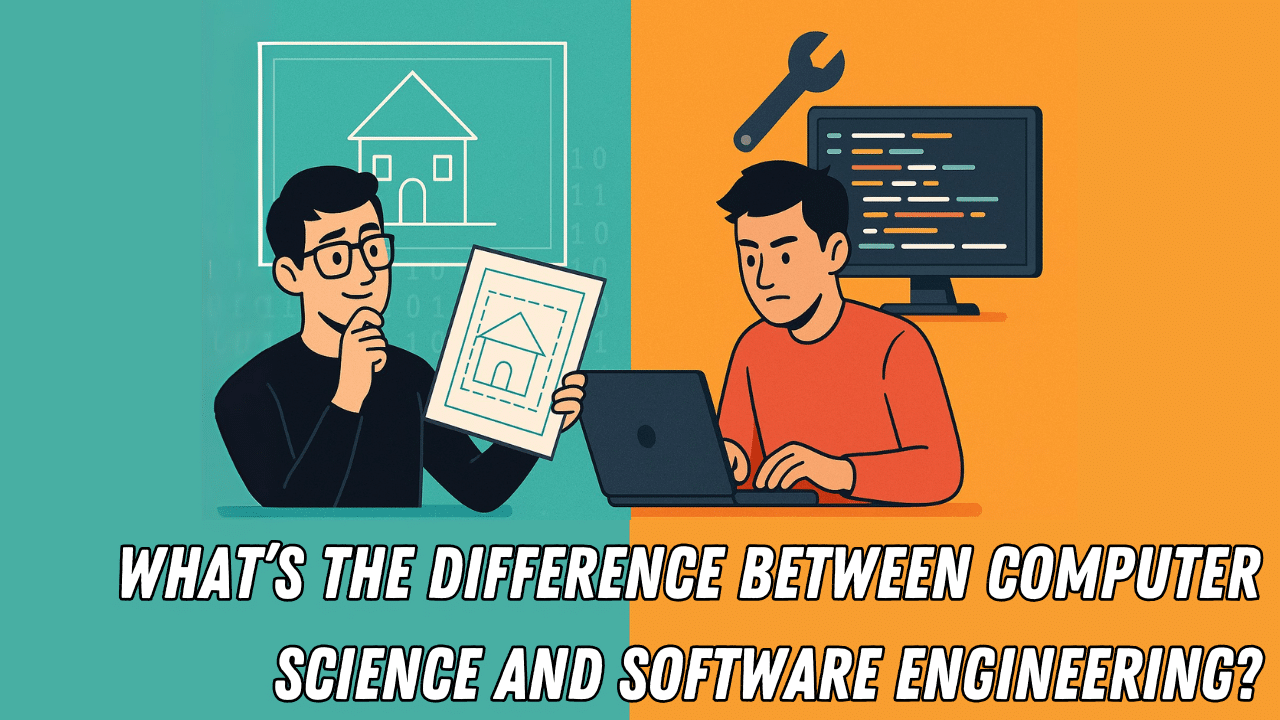
Computer Science: Designing the Blueprint

Imagine you’re building a house. Computer Science is like being the architect. You’ll be designing the overall structure, figuring out how things should work on paper, and making theoretical blueprints. Computer scientists dive deep into algorithms, data structures, and the core principles behind how computers work. They think about optimisation, theory, and logic.

A computer science major might spend years perfecting an algorithm that makes sorting a million numbers 0.0001 seconds faster. They focus on the mathematical and theoretical aspects of computing, designing elegant, optimal solutions to complex problems.

Software Engineering: Turning Theory Into Reality

On the flip side, Software Engineering is more hands-on. If computer science is the architect, software engineering is the construction worker. Software engineers take those carefully crafted blueprints—whether from computer scientists or other designers—and bring them to life. They write the code, debug issues, and ensure the system works smoothly for users.

While CS might focus on the ‘why’ of how things work, software engineers focus on the ‘how’. They are tasked with building functional, reliable software, often facing real-world challenges like fixing bugs and meeting deadlines. Think of them as the ones making sure the system doesn’t fall apart when the user clicks the wrong button.

The Role of Computer Engineering

There’s also Computer Engineering (CE), a field that blends aspects of both computer science and electrical engineering. If CS is the architect and SE is the builder, CE is the person actually manufacturing the physical components that power the systems. They design and build the hardware that runs the software.

So, Which One Should You Choose?

When choosing between Computer Science and Software Engineering, it all comes down to your interests and goals. Do you prefer designing theoretical systems and algorithms (CS), or are you more interested in bringing these ideas to life and solving practical issues in real-world applications (SE)?

Both paths are rewarding and essential to the tech ecosystem, but understanding the difference will help you decide which role best suits your skills and passions.

Want to learn more about the fascinating world of computer science and software engineering? Watch the full video to get more insights into these fields.

For more Lesson Hacker Videos, check out the CraignDave YouTube playlist HERE.

Visit our website to explore more cutting-edge tech-transforming news in the computer science world!


Related posts

What is Endianness?

Welcome to the quirky world of endianness — a classic computing debate that’s as petty as indenting code with tabs versus spaces or whether ketchup belongs in the fridge.

15 January 2026

Does anyone still use low-level code?

Low-level programming isn’t dead — it quietly powers the devices we rely on every day, from cars to toasters. If you love digging into game engines, compilers, or hardware drivers, your skills are more essential than ever.

14 January 2026

Should AI have morals?

Should AI always agree with us, or tell us when we’re wrong? We explore whether artificial intelligence should be kind, or correct — and why the answer really matters.

13 January 2026

What is vibe coding? Is it the future of programming?

Vibe coding lets you tell an AI what you want in plain English—and it writes the code for you. But is it genius productivity or just a confident intern with a wild imagination?

12 January 2026

Trinket is shutting down in June 2026

Time2Code uses Trinket as its online IDE for Python. Unfortunately, that service is shutting down later this year, probably in […]

9 January 2026

What does a GPU actually do?

A GPU isn’t just a graphics chip—it’s like a room full of toddlers with crayons, all scribbling at once to bring your game to life. While CPUs think carefully, GPUs colour fast.

Fail safeguarding if phone used in school?

Should schools fail an Ofsted safeguarding inspection because of mobile phones? We dig into the headlines claiming schools should fail Ofsted if pupils are seen using phones.

Should beginners use AI to code?

Should beginners use AI to help them code? It might seem like a shortcut—but relying on it too soon could stop you learning the skills you actually need.

8 January 2026

Is the Online Safety Act protecting us, or going too far?

The UK’s new Online Safety Act aims to protect young people online, but its sweeping measures are raising big questions about privacy, freedom, and access to information. Is it safeguarding the vulnerable, or simply going too far?

7 January 2026

Back

Getting maximum value from Smart Revise with Year 11

15 April 2025

Exams are only a few months away and what your students do now is going to make the biggest impact to their results in August. It almost doesn’t matter what their work ethic has been like up until now, there is still time for all students to achieve their potential if they engage in regular active revision using the best techniques from today. 

Once you have delivered all the course content switch the topic filters to “Student controlled” in Smart Revise. Make sure you have Quiz, Terms reflective, Terms interactive and Advance modes enabled in the class settings. This will allow the students to take charge of what to revise, when and how. 

Top tips for students 

  • Use the Summary report to know the topics that are your strengths and weaknesses. 
  • Click on a Quiz pie chart in the summary report to do multiple-choice questions only on weaker topics. 
  • Look at the Top 10 revision references at the bottom of the summary report.
    These are your specific weaknesses across the whole course. You can watch the Craig’n’Dave videos if that helps but beware of passive revision. 
  • Click on a Terms pie chart in the summary report and filter the cards you want to focus on: sad, neutral, happy, unanswered. Reflective is a passive reflection. Interactive is more challenging but is essential. You should be able to define terms at this stage of the course. Use reflective as a reminder and interactive when you are revising. 
  • Click on an Advance pie chart in the summary report to see exam-style questions. Use the next button to find a question you want to attempt. Start with the low mark questions first and work up. Pretend you are in a real exam. Set an alarm on your phone for the number of marks the question is worth and spend that amount of time answering the question. 
  • Use the built-in mark schemes to mark your answer and be realistic. It doesn’t matter if you get low marks when you are practicing. 
  • If you don’t get full marks, note the question number. Have another go at the same question a few days later to see if you can improve your answer. Use the “last answer” button to see your most recent answer. 
  • Start with low mark questions, but don’t avoid the high mark Advance questions forever. You will get lots of 1–6-mark questions in your exam and one 8-mark question in each paper. 
  • Just because you know something this week doesn’t mean you will remember it next week so don’t neglect the topics you have mostly green on the pie charts in the summary report. Checking you still have the understanding is important. 
  • Start Terms – Leitner mode is good for daily reminders of terminology once you have mostly green or yellow pie charts in most of the topics on your summary report. Remember to set the topic filters to the whole course before using Leitner mode.
     

Beyond Smart Revise 

Although Smart Revise is great, it is important to provide students with real past papers so they can practice writing on lines with a pen too! Some papers will be publicly available on exam board websites, but others will require logging in to their portals to be downloaded. 

We often assume students will just “know” how to revise without being explicitly taught how to. This is a mistake. Show students the technique of mind mapping and build a mind map for a topic with them, maybe using the Terms in Smart Revise for reference. Smart Revise compliments this tried and tested approach, it does not replace it. 

One technique we developed with our students is the “what why web” (see what we did there) which is a scaffolded approach to making a mind map. Write the concept in the middle and then on a second branch state what words are associated with the concept, and on a third branch state why it is necessary, any implications and examples. 

For example, the concept of registers for OCR J277 might look like this: 

As Dunlosky showed, the worst revision students can do is reading their notes, looking over classwork and watching videos because these are passive techniques. Knowledge organisers and revision guides are useful, but they should only be used as a reference guide to check understanding, in themselves they are not revision.

By the way, put those highlighter pens away because research has shown that highlighting notes is worthless!

Related posts

What is Endianness?

Welcome to the quirky world of endianness — a classic computing debate that’s as petty as indenting code with tabs versus spaces or whether ketchup belongs in the fridge.

15 January 2026

Does anyone still use low-level code?

Low-level programming isn’t dead — it quietly powers the devices we rely on every day, from cars to toasters. If you love digging into game engines, compilers, or hardware drivers, your skills are more essential than ever.

14 January 2026

Should AI have morals?

Should AI always agree with us, or tell us when we’re wrong? We explore whether artificial intelligence should be kind, or correct — and why the answer really matters.

13 January 2026

What is vibe coding? Is it the future of programming?

Vibe coding lets you tell an AI what you want in plain English—and it writes the code for you. But is it genius productivity or just a confident intern with a wild imagination?

12 January 2026

Trinket is shutting down in June 2026

Time2Code uses Trinket as its online IDE for Python. Unfortunately, that service is shutting down later this year, probably in […]

9 January 2026

What does a GPU actually do?

A GPU isn’t just a graphics chip—it’s like a room full of toddlers with crayons, all scribbling at once to bring your game to life. While CPUs think carefully, GPUs colour fast.

Fail safeguarding if phone used in school?

Should schools fail an Ofsted safeguarding inspection because of mobile phones? We dig into the headlines claiming schools should fail Ofsted if pupils are seen using phones.

Should beginners use AI to code?

Should beginners use AI to help them code? It might seem like a shortcut—but relying on it too soon could stop you learning the skills you actually need.

8 January 2026

Is the Online Safety Act protecting us, or going too far?

The UK’s new Online Safety Act aims to protect young people online, but its sweeping measures are raising big questions about privacy, freedom, and access to information. Is it safeguarding the vulnerable, or simply going too far?

7 January 2026

Back

What are the benefits of studying OCR Computer Science GCSE?

11 February 2025

Computer Science is shaping the world around us, and there’s no better place to start than with the OCR GCSE Computer Science qualification. Beyond simply learning about coding and algorithms, this course equips students with skills that have real-world applications and set them up for a future filled with exciting opportunities.

Unlocking essential skills

The OCR GCSE Computer Science course is designed to build foundational skills that are highly valued across industries. Logical thinking and problem-solving are at its core, enabling students to break down complex challenges into manageable solutions—a skill that’s just as valuable in business meetings as it is in coding projects.

Students also develop computational thinking, learning to create efficient solutions to problems. Whether writing code or managing a personal budget, these skills have practical relevance in everyday life.

Real-life applications and career pathways

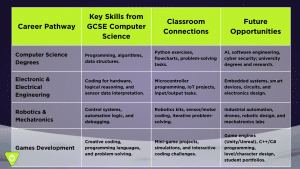
Studying Computer Science doesn’t just prepare students for a single career; it opens doors to an array of opportunities. With technology touching every sector, skills gained from the OCR GCSE can lead to careers in cybersecurity, game design, artificial intelligence, software engineering, and more.

For those not directly pursuing tech-related careers, the knowledge gained—such as understanding data structures or networking principles—provides a strong foundation for roles in finance, marketing, or project management. In today’s digital economy, these skills make candidates stand out.

A stepping stone to lifelong learning

Beyond job prospects, the OCR GCSE Computer Science qualification nurtures an appreciation for how technology impacts our world. Students gain the confidence to learn new tools and programming languages, preparing them for further study or adapting to future tech advancements.

Why choose Craig’n’Dave?

At Craig’n’Dave, we’re passionate about making Computer Science engaging and accessible for students. Our resources are tailored to support learners every step of the way, ensuring they gain the most from their studies.

Ready to explore the exciting world of Computer Science?

Visit Craig’n’Dave today and discover resources that bring Computer Science to life.

Empower your students or yourself to succeed with OCR GCSE Computer Science—because the future belongs to those who understand technology.

Related posts

What is Endianness?

Welcome to the quirky world of endianness — a classic computing debate that’s as petty as indenting code with tabs versus spaces or whether ketchup belongs in the fridge.

15 January 2026

Does anyone still use low-level code?

Low-level programming isn’t dead — it quietly powers the devices we rely on every day, from cars to toasters. If you love digging into game engines, compilers, or hardware drivers, your skills are more essential than ever.

14 January 2026

Should AI have morals?

Should AI always agree with us, or tell us when we’re wrong? We explore whether artificial intelligence should be kind, or correct — and why the answer really matters.

13 January 2026

What is vibe coding? Is it the future of programming?

Vibe coding lets you tell an AI what you want in plain English—and it writes the code for you. But is it genius productivity or just a confident intern with a wild imagination?

12 January 2026

Trinket is shutting down in June 2026

Time2Code uses Trinket as its online IDE for Python. Unfortunately, that service is shutting down later this year, probably in […]

9 January 2026

What does a GPU actually do?

A GPU isn’t just a graphics chip—it’s like a room full of toddlers with crayons, all scribbling at once to bring your game to life. While CPUs think carefully, GPUs colour fast.

Fail safeguarding if phone used in school?

Should schools fail an Ofsted safeguarding inspection because of mobile phones? We dig into the headlines claiming schools should fail Ofsted if pupils are seen using phones.

Should beginners use AI to code?

Should beginners use AI to help them code? It might seem like a shortcut—but relying on it too soon could stop you learning the skills you actually need.

8 January 2026

Is the Online Safety Act protecting us, or going too far?

The UK’s new Online Safety Act aims to protect young people online, but its sweeping measures are raising big questions about privacy, freedom, and access to information. Is it safeguarding the vulnerable, or simply going too far?

7 January 2026