
Back

Smart Revise October 2025 update

A number of quality-of-life updates to Tasks for both students and teachers.

Student in a library.

11 October 2025

Archived tasks no longer appear in a student’s task list

It’s a fact, some students don’t complete their Smart Revise tasks! While you might not have enforced a deadline, time has now passed, and you don’t expect the student to complete the work. For example, at the beginning of year 11 you may want to wipe the slate clean of anything outstanding from year 10. Archiving tasks now provides that facility because archived tasks will no longer show on the student’s task list.

If there are students that can have marks released, before you can archive a task you will be prompted whether this should be done first.

New visibility toggle for a student’s name when marking or viewing a task answer

Teachers will often want to project and share an answer a student has given to a question for reflection with the class. This is useful for engaging with the students to address misconceptions, exam technique or to have discussions about how an answer can be improved. However, it can be a little embarrassing for the student who’s work is being observed.

There is now a toggle on the teacher task marking screen to hide the student name.
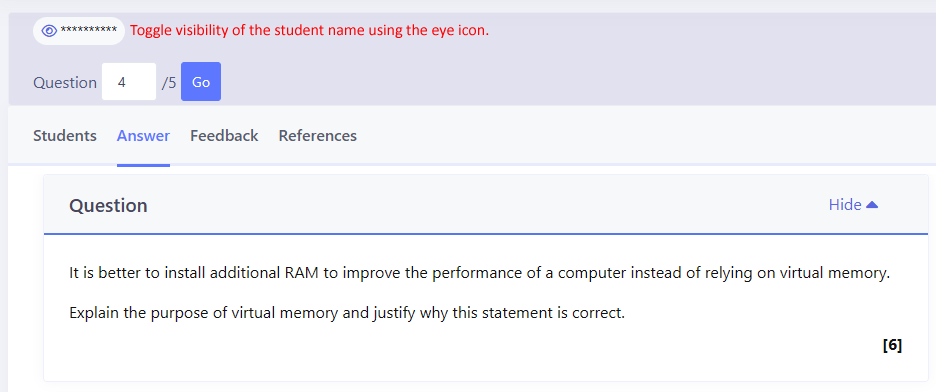
Toggle student name

Task analytics reports for students

Students now have the same reports as teachers for analysing the outcomes of a task. The only difference is that they can only see their own data. This includes:

  • Question analysis: see the top 10 least and most well answered questions in the task. Click the question to navigate to it.
  • Question matrix: see the marks for each question at a glance with colour coding to indicate stronger and weaker questions.
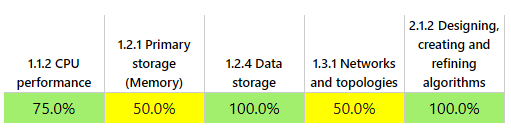
  • Topic matrix: see the strengths and weaknesses by topic for those tasks that span more than one topic.
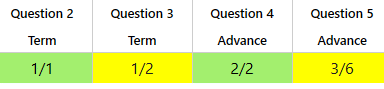
Question matrix report

Topic matrix report

Select and unselect all students in a class when assigning a task

A checkbox has been added to the page where you assign students to a task. Ticking this will select all students who have not already had the task assigned. Unticking this will unselect all the students who have not already had the task assigned. By unticking the box you can easily select just one or two students which is ideal for assigning intervention tasks.
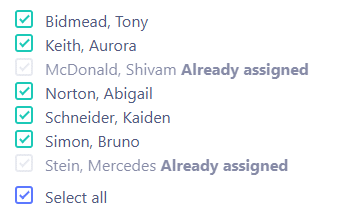
Select all students checkbox

Goals feature update

We are currently testing and refining our next big ticket feature, “Goals”. This feature automatically sets weekly targets for students based on their data and the stage of the course. Solving the problem of students not knowing how much Quiz, Terms and Advance they should be doing. This will be available soon.

Related posts

Taking the next step

Teaching careers rarely follow a straight ladder, and the most valuable opportunities are often the ones that sit to the side of it. The key is understanding what each role really gives you — and whether that’s career progression, professional growth, or both.

22 May 2026

Cambridge OCR: Supporting Teachers, Inspiring Students & at this year’s Festival of Computing

Cambridge OCR, a leader in UK Computing education, is sponsoring this year’s Festival of Computing —bringing expert insight, CPD, and a passion for supporting teachers. Discover how they’re shaping the future of qualifications and why you won’t want to miss connecting with them at the event.

15 May 2026

Would we do it again?

As May edges closer to its final days, many teachers find themselves staring at the same date every year: 31 […]

8 May 2026

AQA at the Festival of Computing 2026

AQA, the UK’s largest exam board and education charity, joins the Craig’n’Dave Festival of Computing 2026 as Headline Sponsor, bringing expert insight, CPD sessions and curriculum expertise to support secondary Computer Science teachers.

7 May 2026

How a GCSE in computer science can shape your students’ future careers

A GCSE in Computer Science isn’t just a qualification—it’s a launchpad to exciting careers in tech, from gaming and robotics to cyber security and AI.
By connecting classroom learning to real-world pathways, teachers can inspire students to see the true value and future potential of their skills.

1 May 2026

How a GCSE in Computer Science can shape your future career

A GCSE in Computer Science opens the door to careers in gaming, robotics, cyber security, and beyond.
Discover how this subject can lead to exciting degrees and future opportunities in the tech world.

29 April 2026

Do we need government AI copyright laws?

AI is transforming creativity — but are we protecting the people behind the art? We explore the UK’s heated debate over AI copyright laws and what they mean for creators and innovation.

8 April 2026

How Do Map Apps Work?

Discover how your map app uses graph theory and clever algorithms to find the fastest route, even before you spot the traffic jam. It’s the smart tech behind every turn and reroute you trust.

What is Chip Binning?

Chip binning is how manufacturers sort silicon chips based on their performance, turning some into high-speed processors and others into more modest models. It’s like baking cookies—some come out perfect, others just good enough.